The JSON Formatter and Validator web service is a tool designed to simplify and speed up the handling of JSON files with the JSON format. JSON (JavaScript Object Notation) is one of the most commonly used formats for storing and sharing data, especially in web platforms, APIs, and databases. However, a natural JSON file can often be chaotic, especially if the data is unstructured or concatenated. This is where a JSON viewer on the Internet can help: it leads you to interpret, present, validate, and create JSON within a clear framework.
This tool presents JSON in a neat, tree-like structure, making it easier to read and troubleshoot. If you are a programmer, student, or statistical analyst, a JSON viewer on the Internet can save lag and improve accuracy.
Below are the steps:
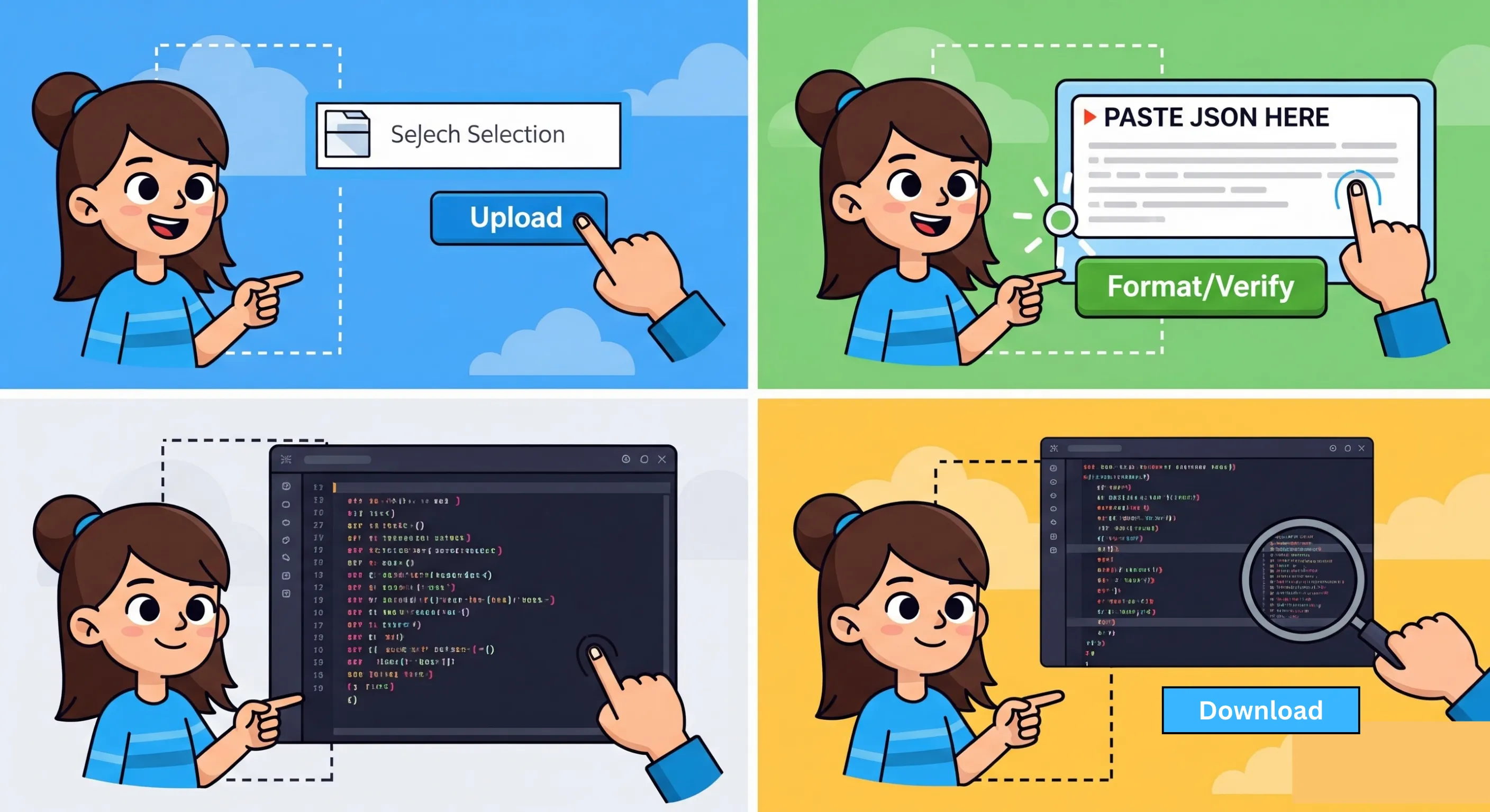
Upload JSON Data: You can upload a JSON file from your computer.
Click the Format/Verify button: After entering the file or other information, click the button to activate it.
Structured JSON output: The device will immediately format and display your JSON. If your JSON file is invalid, it can also highlight all syntax errors.
Edit or verify: You can edit your JSON file on your device and then double-verify it to make sure it is correct.
The current quick method ensures that even novices can easily open and dictate the JSON file without the need for code awareness.
This online JSON formatter is completely free, and this is one of its best features. There are no hidden charges, no premium versions, and no restrictions on them. You can create and validate as many JSON files as you want without any cost.
We will develop a new tool to make your work easier. It will instantly format your JSON file by detecting any unintentional errors. The system will run smoothly and quickly, saving you precious time.
Your factual security will be a primary condition. This tool processes the JSON file securely without accessing the store; otherwise, you can share your information. Since it runs directly in the browser, you can confidently create your document, knowing the information around you.
This tool not only edits JSON, but also allows you to display the results in different code formats. This flexibility is especially useful for developers who have to work a lot with different programming languages and need JSON compatibility.
Next, formatted, you can directly download the restored JSON file with a simple click. This eliminates the need for copying and ensures that your information is ready for any work, experiment, or other research tool.
This tool works smoothly on all devices – laptops, desktop computers, tablets, and smartphones. It is browser-based, so you don’t have to worry about installing any other software, as you have your tool. Just open it in your favorite browser, and it will start working immediately.
Although the current JSON formatter is a web-based formatter, you don’t need any additional software. Everything you need is available in one place: upload, format, check, edit, and download.
Nowadays, JSON is everywhere, from mobile programs to APIs and databases. Working with natural JSON manually can be frustrating and inaccurate. This tool simplifies the whole process by making the process of reading and debugging a JSON file. Developers can save their time, students can improve their understanding of JSON structures, etc.
The current JSON formatter will be the perfect companion for anyone who manages JSON information systematically, with features such as free usage, security, cross-device compatibility, and instant format.
We would love to hear your feedback. Your review will help us continue improving.
Please Review Us
A Display JSON in HTML pretty is an application that helps a user to view, parse, format, and analyze JSON data. It shows the JSON in a structured form, making it much easier to read and understand in dealing with large or complex datasets. These tools normally allow pretty formatting, tree view, and syntax highlighting, which will permit the visualization of data hierarchies and validation of correctness for the data. Html json viewer online free are specially useful for developers, analysts, or anyone needing to explore or debug JSON content.
Key requirements of JSON are clear data structure that are made of key-value pairs; the keys must be always a string and the value may vary with other types such as a string, numbers, array, or even other JSON objects. It also supports objects that are an ordered collection of key-value pairs enclosed in curly braces and arrays that are an ordered list of values enclosed in square brackets. JSON supports basic data types: strings, numbers, booleans, null, arrays, and objects. One has to know that JSON does not support comments, therefore a data-driven format. The correct syntax also plays a role; this means keys are to be enclosed in quotation marks, pairs have to be separated with commas, and the entire structure must be correctly nested.
JSON can best be read using a Free html json viewer or formatter. They clean up the output and make the data easy to read, sometimes even with tree views that make navigating nested data easier. Syntax highlighting might also be present, allowing differentiation between keys, values, and data types. Most Free html json viewer also include "pretty formatting" that uses line breaks and indentation to let users understand the structure of a JSON. There are online tools like HTML JSON viewers and JSON formatters that enable users to easily view JSON directly in any web browser, thus giving a simple and convenient solution to view JSON without the use of any extra tools.
The best way to validate JSON is through a JSON validator tool. These tools automatically check if the provided JSON data follows the correct syntax rules. They detect errors like missing commas, unmatched braces, or incorrect data types. Many online validators allow users to paste or upload their JSON data and instantly receive feedback on whether the data is valid or contains any mistakes. Some viewers have built-in validation features to recognize errors as soon as one is viewing the data. Validation, therefore, can happen upon viewing while ensuring that the JSON file is correctly formatted.

Your Rating : Good!